
Virtual staging is a fast, affordable way to make empty properties look more appealing to buyers by adding digital furniture and décor to photos. In New Zealand, companies like Fast Virtual Staging deliver high-quality images within 12–24 hours for just $35 NZD per image, with a free order guarantee if they miss the deadline. Here’s how it works:
- Prepare your property photos: Clear out furniture, tidy up, and take sharp, well-lit images (landscape orientation, 3000×2000 pixels recommended).
- Submit your order online: Upload photos, pick a design style (e.g., Scandinavian or Modern), and share preferences.
- Receive and review images: Get staged photos via email, check for accuracy, and request up to two free revisions.
- Use images to boost your listing: Add staged photos to platforms like Trade Me Property or realestate.co.nz to attract more buyers.
Virtual staging helps buyers visualise a property’s potential, improving interest and reducing time on the market. Ready to try it? Upload your photos and transform your listing in just a day.
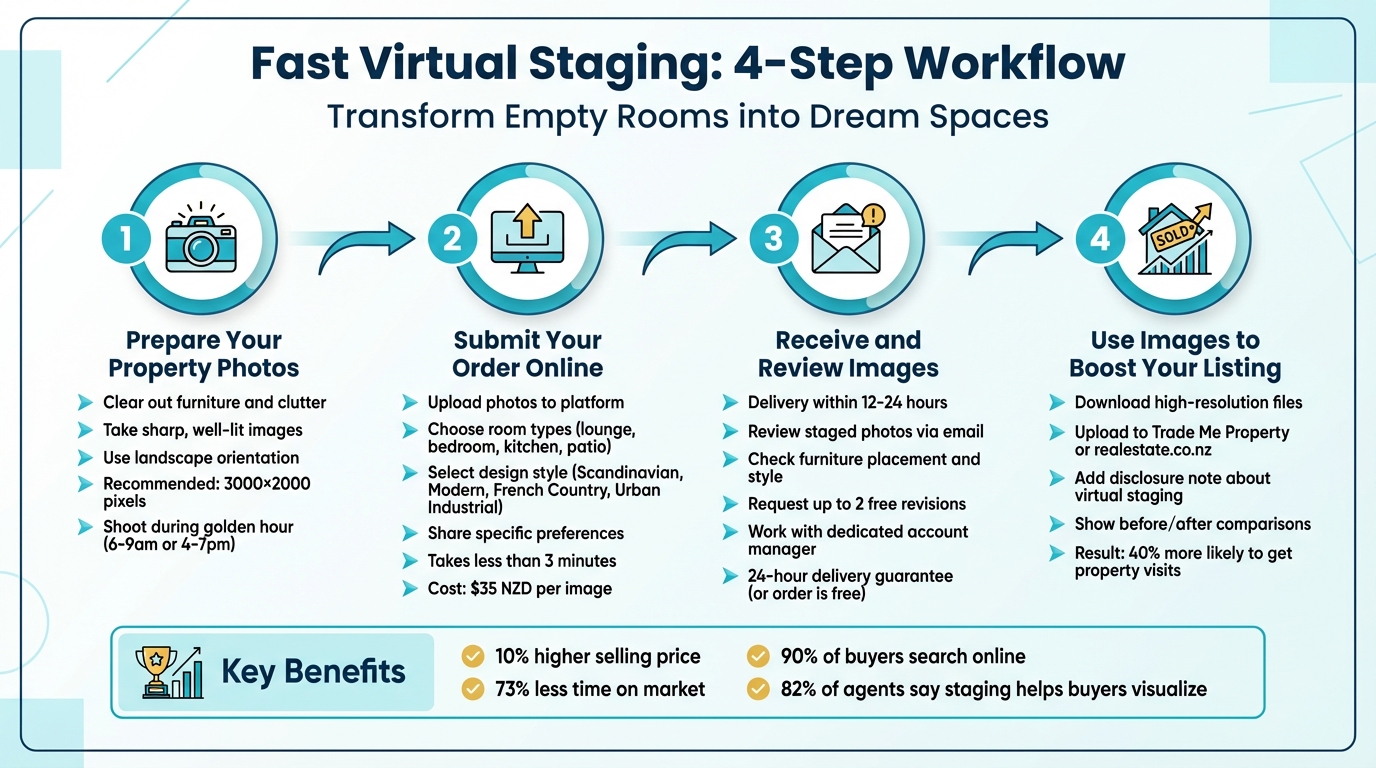
4-Step Virtual Property Staging Process: From Photo to Listing in 24 Hours
How to Prepare Your Property Photos
Your photos play a crucial role in showcasing staging realism. By preparing your space and capturing sharp, well-lit images, you provide digital artists with the perfect foundation for stunning virtual transformations. Here’s how to get your property photos just right.
Clear Out and Tidy the Space
Empty rooms are ideal for virtual staging. Start by removing all furniture, personal items, clutter, and small objects like magnets or notes from surfaces. This creates a blank slate, giving the staging team the flexibility to place digital furniture naturally and effectively.
Begin with simple tasks: hide TV cables and power cords, and vacuum or sweep to eliminate dust that high-resolution photos might highlight. While digital editing can correct some issues, such as messy wires, addressing them beforehand saves time and ensures better results.
Don’t overlook the small details that potential buyers notice. Dust baseboards, clean air conditioning vents and ceiling fans, and wipe window tracks. Glass surfaces and mirrors should be streak-free, and all light bulbs should be in working order with a consistent colour temperature to avoid unwanted shadows in the final images.
Sebastian Petrescu from Elevated Photos suggests: "Find inspiration by looking at photos of other home interiors that truly nailed their photoshoot."
For outdoor areas, take time to mow the lawn, weed the garden, and waterblast driveways or paths. A clean, well-maintained exterior enhances kerb appeal and complements the quality of your interior staging.
Once your space is ready, it’s time to focus on capturing high-quality photos.
Take Clear, Well-Lit Photos
The foundation of accurate virtual staging lies in high-quality images. Submit photos with a resolution of 3000×2000 pixels at 72 DPI. Use a DSLR or mirrorless camera and shoot in RAW format for the best results.
Always shoot in landscape orientation. Landscape photos provide more horizontal space for placing digital furniture, while portrait shots can limit flexibility. Position yourself in a doorway or corner to capture as much of the room as possible, and avoid using ultra-wide or fisheye lenses, which can distort room dimensions and make virtual furniture placement look unnatural.
Maximise natural light by opening windows and curtains, and ensure all lights are turned on. This helps manage shadows and creates a welcoming atmosphere. The "golden hour" – typically between 6–9 am or 4–7 pm – is the ideal time for shooting, as the natural light is softer and more even.
PhotoUp advises: "By turning on all of the lights, the virtual stagers can better deal with shadows and shading, which helps make each room feel natural and realistic once the furniture is added."
When composing your shots, aim to show about twice as much floor and wall area as ceiling. This balance ensures digital furniture is placed where it naturally belongs – on floors and against walls. Before uploading your photos, rename the files clearly by room (e.g., "LivingRoom-Angle1.jpg") to help staging editors easily identify each space.
Taking these steps ensures your photos are ready for a seamless virtual staging process.
How to Order Virtual Staging with Fast Virtual Staging
You can complete your staging order in less than three minutes. The platform simplifies every step of the process, from setting up an account to submitting your final request. To get started, create your account.
Create Your Account and Upload Photos
Click on "Order Now" to begin. Choose how many images you need and specify the room types – options include lounge, bedroom, kitchen, or even outdoor patio spaces. Whether you’re working on residential or commercial properties, the platform accommodates everything from family homes to office spaces. To ensure accurate staging, label each photo by room. For New Zealand buyers, popular design styles like Scandinavian or Modern are great options to consider.
Share Your Preferences
Pick your preferred design style – Scandinavian, Modern, French Country, or Urban Industrial. Use the brief section to include any specific instructions. Whether you provide detailed input or leave the creative decisions to the professional 3D artists, your preferences will guide the process. Clear instructions help ensure your images are completed within the 24-hour turnaround time. Plus, each order comes with a dedicated account manager to assist you.
Fast Virtual Staging offers a 24-hour delivery guarantee for residential orders. If they miss the deadline, your order is free.
"I found the platform easy to use for ordering my digital furniture for empty rooms to give my real estate listings a boost! The services were affordable and I really enjoyed working with my account manager."
- Brad Minhinnick, Director, LINK Property Management
Review and Adjust Your Staged Images
Once you receive your staged images via email – usually within 12–24 hours – take a close look at each room. Check if the furniture fits well and aligns with the style preferences of NZ buyers. If something feels off, don’t worry – your account manager is there to assist. You can refine your digital selections and request any adjustments needed to make everything just right.
Choose Furniture from the Digital Library
Our digital library offers a range of styles, including Scandinavian, Modern, Hamptons, and French Country, all thoughtfully curated for NZ homes. Whether the property is in the heart of the city or tucked away in the suburbs, choose furniture that complements its vibe. Using digital scaling, our 3D artists ensure that every piece is perfectly sized to match the room’s actual metric dimensions, creating a seamless and natural appearance. Prioritise staging high-traffic spaces like the living room, main bedroom, and kitchen. After all, 82% of buyers’ agents say staging helps buyers imagine the property as their future home.
Request Changes with Free Revisions
You’re entitled to two free revisions with every order. Use these to adjust furniture placement, try different colours, or experiment with new styles to better suit the property. Just provide your account manager with clear, detailed instructions for any tweaks. Clear communication ensures the final images meet your expectations, all within the 24-hour timeframe.
sbb-itb-7b8b2a2
Use Your Staged Images to Sell Properties
Once your staged images are polished and ready, it’s time to put them to good use. These high-quality renders can grab attention online and turn casual browsers into serious buyers.
Download and Add Images to Your Listings
After finalising your images, you’ll receive a download link via email. These high-resolution files are specifically formatted for easy upload to platforms like Trade Me Property, realestate.co.nz, or your agency’s website. When adding them to your listings, include a note that the images are virtually staged. This small detail helps set accurate buyer expectations while still showcasing the property’s potential.
Show Before and After Photos
Side-by-side before-and-after photos are an incredibly effective way to market a property. They let potential buyers see the transformation, highlighting the home’s possibilities while still being transparent about its current state. This is particularly helpful for smaller or oddly shaped rooms, as it demonstrates how furniture can fit and make the space functional. Did you know that 40% of buyers are more likely to visit a property in person after seeing it virtually staged? These comparisons tell a compelling story, building buyer confidence and helping them envision the home as their own.
Get Started with Fast Virtual Staging
Once your staged images are ready, you’re just a few clicks away from making your property market-ready. Simply upload your high-resolution property photos, select your preferred design style, and submit your request. The entire process takes less than three minutes. In just 12–24 hours, professional 3D artists will provide stunning, photo-realistic renders.
At just $35 NZD per image, Fast Virtual Staging offers an affordable alternative to traditional staging – costing about 10% of what physical staging typically requires. Plus, you get two free revisions and a dedicated account manager to ensure your images are delivered within the promised 24-hour timeframe.
Staged properties consistently outperform non-staged ones, selling for up to 10% more and spending 73% less time on the market. With 90% of buyers beginning their property search online, having high-quality digital visuals is no longer optional – it’s essential for capturing attention and standing out.
"Adding virtual furniture to my property photographs always generates increased interest in my listings. I can choose my own style of furniture and turn-around times are super-fast for the quality." – Jack Dangerfield, Real Estate Agent, Ray White
Whether you’re showcasing a cosy home or a commercial property, Fast Virtual Staging offers the speed, quality, and affordability you need to thrive in New Zealand’s competitive property market.
FAQs
What’s the difference between virtual staging and traditional home staging?
Virtual staging uses digital technology to add lifelike furniture and décor to property photos, while traditional staging involves physically furnishing and decorating a home. One major advantage of virtual staging is speed – spaces can be digitally transformed in as little as 24 hours, making it a great option for urgent property listings or online marketing campaigns.
Another significant difference is cost. Virtual staging is far more budget-friendly, with prices typically ranging from NZ$35 to NZ$50 per image, compared to the NZ$1,500 to over NZ$5,000 you’d spend on traditional staging for an entire property. Virtual staging also offers unmatched flexibility, allowing you to tweak designs effortlessly without the hassle of moving heavy furniture around.
This approach works especially well for vacant homes, online property listings, and attracting overseas buyers. On the other hand, traditional staging is often the go-to choice for in-person viewings, as it helps create a stronger emotional connection by allowing potential buyers to physically experience the space.
What are the best tips for taking photos for virtual staging?
To achieve the best results with virtual staging, begin by decluttering and thoroughly cleaning the space. Remove personal belongings, extra furniture, and any clutter to create a neutral and welcoming atmosphere. A clean, minimal look helps potential buyers envision the space as their own. Make sure the room is well-lit by opening curtains or blinds to let in natural light, and switch on lights to brighten darker areas.
When taking photos, position yourself in corners or doorways to capture the full expanse of the room without distortion. Avoid standing in places where virtual furniture will later be added. Use a standard lens or a slightly wide one – steer clear of ultra-wide-angle lenses, as they can warp the room’s proportions. Before photographing, address small issues like scuffed walls or loose hardware to give the space a polished appearance.
Lastly, maintain consistent camera settings, particularly for exposure and white balance. This ensures your images look professional and cohesive. Following these steps will result in high-quality photos that elevate your property listings and attract more interest.
How does virtual staging help sell a property faster?
Virtual staging is a game-changer when it comes to selling properties. By digitally transforming empty or outdated spaces into inviting, stylish interiors, it helps buyers envision the property’s full potential. This makes listings not only more appealing but also more likely to stick in a buyer’s mind.
Homes featuring virtual staging tend to grab more attention online, which often translates to increased interest, faster sales, and even higher offers. Plus, it’s a budget-friendly and time-saving solution – no need for physical furniture or drawn-out prep work to make a space shine.